Samsung Gallery Google sync is bringing a new way to access photos and videos across supported Galaxy devices. In a November 10 announcement, Samsung described a service that connects Gallery with Google storage, allowing users to move between compatible phones and tablets while keeping their synchronized media accessible. Initial support covers selected devices running One UI 9, with expansion planned in phases.
The update addresses a familiar problem. A phone often becomes the place where photographs are captured, while a tablet offers a more comfortable screen for reviewing them. Moving files manually can interrupt that routine.
The practical appeal is a more continuous experience inside Gallery. However, understanding where originals are stored, which account holds them and how changes travel between devices remains essential to using the service confidently.
How the New Connection Works
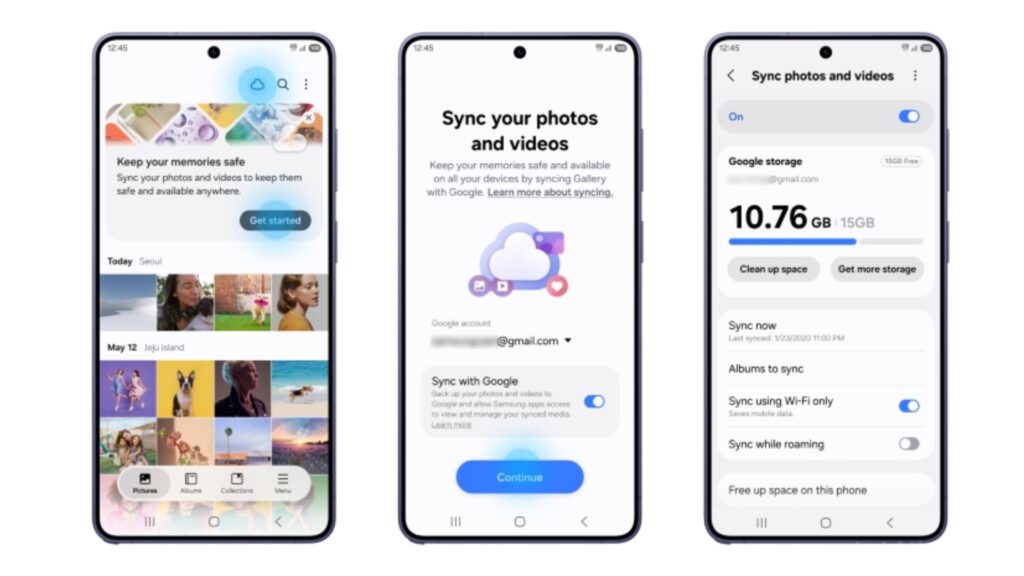
Samsung says supported devices must use the same Samsung and Google accounts and have synchronization enabled. Setup is available through the Cloud icon, a Gallery tip card or the “Sync photos and videos” option in Gallery settings. A separate cloud account is not required beyond the Samsung and Google accounts involved.
For users, the account requirement deserves attention before setup.
Someone with separate personal and work Google accounts should identify which one they intend to use. That choice affects where the synchronized collection belongs and which storage allowance it draws from.
A useful first step would be to check the account names on both devices. Starting with a clear arrangement can prevent later confusion about why one tablet shows a collection while another does not.
Previews Make a New-Device Setup More Flexible
Samsung explains that a compatible new device can display previews of synchronized media without first downloading the complete collection. Users can select an original file when they need to download it.
Our assessment is that this could be particularly useful when changing phones or adding a tablet.
A large personal library does not necessarily need to occupy every device in full. Someone may want to browse years of photographs while keeping only a smaller selection ready for editing or sharing.
The distinction between a preview and an original should remain clear. Before an important journey or presentation, a user could confirm that the necessary files are actually downloaded and usable in the intended application.
Freeing Device Space Requires a Different Action From Deleting
The new space-saving feature removes local originals after synchronization while leaving thumbnails visible in Gallery. Samsung separately states that deleting a synchronized item in Gallery also removes it from the linked Google storage and connected Galaxy devices.
These actions serve different purposes.
A person trying to reclaim phone storage should understand which command preserves the synchronized collection. Removing an unwanted image from the library is another decision entirely.
A sensible familiarization exercise would use an unimportant test photograph. The owner could observe how synchronization, downloading and storage management behave before applying the same actions to a large collection.
That small trial would provide a clearer understanding than learning the distinction while trying to make room urgently.
Google Storage Remains a Shared Allowance
The service uses the Google account’s available storage, shared with Gmail, Google Drive and Google Photos. Samsung notes that the free allowance is up to 15GB; Gallery synchronization does not create an additional allocation.
This makes existing usage part of the setup decision.
A user with a nearly full account should examine the current storage situation before expecting a large photo collection to fit. The relevant question is how much capacity remains available, rather than the headline allowance alone.
For an ongoing routine, occasional storage checks could help avoid surprises. Users should also distinguish the cost of a phone from any optional recurring storage plan they choose to maintain.
Existing Cloud Photos Do Not Automatically Become a Gallery Collection
At launch, the cloud media displayed in Gallery is limited to content synchronized through Gallery after the service is enabled. Previously stored Google content does not automatically appear there.
That limitation matters for people expecting every historical image to appear immediately.
A Google account can contain material accumulated through different applications and devices. Connecting Gallery should therefore be evaluated according to the service’s documented behavior, rather than an assumption that every collection will merge.
For someone organizing years of photographs, the most useful approach is to identify the important collections first. Knowing which application currently holds each one makes it easier to understand what the new connection adds.
What Happens to Earlier OneDrive Collections?
Samsung’s support guidance says direct Gallery synchronization with OneDrive ended on September 30, 2026. Existing files remain in OneDrive and can be accessed through its application. Samsung also explains that users can continue saving new photographs through OneDrive’s own camera-backup feature.
The practical implication is that an earlier collection should be checked where it was stored.
A user moving to the new Gallery experience should avoid assuming that the change automatically transfers an existing OneDrive archive into Google storage. Those are separate services with their own collections and account arrangements.
A simple inventory can help: identify the current archive, confirm access and decide which service will support future use.
A Useful Test Follows a Complete Photo Task
The clearest way to assess the update is through an ordinary sequence.
A user could take a photograph on a supported phone, find it on a compatible tablet and download the original for a familiar task. That might involve preparing a document, sharing an image or inspecting a detail on the larger screen.
The exercise should answer practical questions. Is the correct photograph easy to locate? Is its storage status understandable? Can the user complete the intended task without unnecessary file transfers?
These are suggested usability checks, rather than independent performance findings. This article examines Samsung’s announcement and documentation; it does not present a hands-on speed or reliability test.
Availability Should Be Confirmed on the Exact Device
Samsung describes a phased expansion, with availability varying by model and market.
Owners should therefore check the actual Gallery settings and relevant regional support information. The presence of a recent Galaxy device alone does not establish that the option has reached every configuration.
For households using several devices, confirming support on each one will provide a realistic picture of the benefit.
Why This Matters
Samsung’s new Gallery connection offers a practical route toward keeping a photo collection accessible across compatible devices.
Its strongest benefit is continuity: capture on one device, review on another and retrieve an original when required.
The experience will be most useful when the owner understands the accounts, storage allowance and difference between freeing local space and deleting synchronized content. With those details clear, the update could make everyday photo management more convenient while reducing the need for repeated manual transfers.